
Use System phylogenetic tree
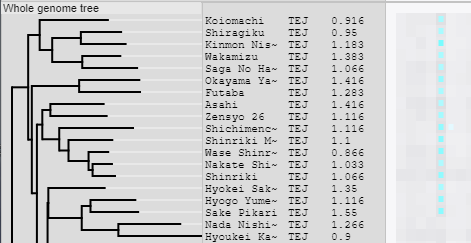
To use the System phylogenetic tree, You need to create a distance matrix and/or Newick and set its file path in the config file.
- This method uses Ajax to perform NJ clustering and create a tree on the server side. Clustering takes a long time for large dataset(>400samples). Speeding up is possible by introducing PHYLIP.
- Midpoint rooting is performed.
- If the number of accessions is 1500 or more, you should use this method because NJ clustering takes too long.
- This method quickly creates tree on the browser side without Ajax or NJ clustering. If you exclude Accessions from a Track, simply remove the leaves from the original Newick tree.
- No midpoint rooting is performed.
There are several ways to create a distance matrix or Newick. Choose the method below that's right for you.
- 1. Use the script included in TASUKE+ package.
-
It is possible to create both the distance matrix and Newick using scripts provided with the package. To create Newick, the PHYLIP package must be installed.
These scripts calculate binary distances by comparing only the presence or absence of variants between accessions, not their allele content.
Running these scripts can take anywhere from tens of minutes to days depending on the size of your dataset.
It takes a lot of time to create binary table, which is a product on the way, but it takes only a short time to create a distance matrix from it. You can specify "-l" option to leave the binary table file unerased and resume from the distance matrix creation step.
- 1-1. Create from DB contents (tasuke_tree_dmatrix.pl)
-
Create distance matrix from the contents of the TASUKE database. Variant information (and Depth if necessary) must already be registered in the DB.
To also create Newick, specify the "-y" option.
Command:
$ tasuke_tree_dmatrix.pl -db
<database name>-u<user>-p<password>-o<outfile>Required:
-db<database name>: Database name for TASUKE
-u<user>: User name
-p<password>: Password for the database
-o<outfile>: Distance matrix path
Optional:
-h<remote host>: To connect remote host name
-r<order file>: Target accession list file(Generally tasuke_www/conf/order.conf) (Default: all Accessions)
-y<dir>: Path to Phylip directory(having "exe/neighbor" under it). Create an additional Newick with name "<outfile>.nwk".
-c<target chrs>: Target chromosomes separated by commas(Default: all Chromosomes)
-v<str>: Specify target variant type. s=SNP, i=INS, d=DEL, order does not matter. ex:"-v s" "-v di" (Default: sid)
-m<calc method>: Distance matrix calculation method. simple(default)/jaccard/dice/soergel
-a : Check DEPTH=NULL and if so, set "NA" to that position. It takes a lot of time. If DEPTH info is not registered, This option will have no effect.
-b : (This option is invalid, but left for compatibility.)
-n : [Use with "-a"] Cross all accessions and skip Column where NA exists
-l : Leave binary table file with name "<outfile>.btbl". This file can be reused for distance calculation by converter/makeBinaryDistanceMatrix
-t<dir>: Temporary directory for creating binary table. Large datasets may require tens to hundreds GB.(Default: /tmp)
If the number of chromosomes/contigs is very large (e.g., >500), you may encounter a "Too many open files" error when running this script. In that case, see "Recommended settings for large-scale datasets".If you left the binary table file with "-l" option, you can recreate distance matrix with the command below. You can respecify "-m" and "-n" options. Distance matrix is output to STDOUT.
Command:
$ converter/makeBinaryDistanceMatrix -i
<outfile.btbl>><outfile2>Required:
-i<outfile.btbl>: Binary table file(0/1 CSV table)Optional:
-m<calc method>: Distance matrix calculation method. simple(default)/jaccard/dice/soergel
-n : Crosses all accessions and skips aggregation for position columns with DEPTH=NULL.
- 1-2. Create from multi-sample VCF file (tree_dmatrix_fromVcf.pl)
-
Create distance matrix from a multi-sample VCF. This takes a little longer than the DB method mentioned above.
Compressed VCF file is supported (gz, bz2).
To also create Newick, specify the "-y" option.
Command:
tree_dmatrix_fromVcf.pl -i
<VCFfile>-o<outfile>
Other options (Not required):
-s<file>: Path to "VCFsampleName > NewName" correspondence table(*). VCFsampleName[,]NewName[\n]...
-y<dir>: Path to Phylip directory(having "exe/neighbor" under it). Create an additional Newick with name "<outfile>.nwk".
-v<str>: Specify target variant type. s=SNP, i=INS, d=DEL, order does not matter. ex:"-v s" "-v di" (Default: sid)
-m<str>: Distance matrix calculation method. simple(default)/jaccard/dice/soergel
-n : Cross all samples and skip Column where "GT=./."(NA) exists
-l : Leave binary table with name "<outfile>.btbl". This file can be reused for distance calculation by converter/makeBinaryDistanceMatrix
-t<dir>: Create temporary data under this directory. Large datasets may require tens to hundreds GB of free space.(Default: /tmp)
(*) Samples not included in this file will be skipped. Even if you do not want to change the name, set the same name before and after the comma. By default it uses all sample-names in the VCF.
As mentioned above, if you leave the binary table file with the "-l" option, you can use it to recreate the distance matrix.
- 2. Create in your own way
-
You can use a distance matrix/Newick created by an external analysis tools(PHYLIP, R, etc.).
- Distance matrix format
- Distance matrix format must be square matrix or lower-triangular (There is no 10-character limit for sample name). AccessionID must be used as sample name and must include all Accessions used by TASUKE.
- Newick format
- AccessionID must be used as sample name and must include all Accessions used by TASUKE. For Newick format details, Please see here.
- 3. Create Newick from an existing distance matrix
-
This method is used when you want to create an additional Newick later based on an already created distance matrix.
There are three ways. Methods 1 and 2 require "TASUKE environment that is capable of web browsing and has a distance matrix set".
- 3-1. Use TASUKE's "Export Current SystemTree" function
-
* This way can be performed throw web browser after completing the installation of TASUKE+.
This way is generally recommended.- Access TASUKE and display SystemTree. (For large dataset with thousands of samples, it may take several tens of minutes to draw the tree)
- Open "Settings > Accession Manager" from the top menu, and set "ID or Name" to "ID" and "Subtitle" to "---(None)" in "Accession title". If the tree nodes are collapsed, press the "Expand all nodes" button.
- Click "Tools > Export > Current SystemTree" from the top menu to download Newick.
- Upload Newick file to the web server using an sftp client (e.g. WinSCP).
- 3-2. Use getNewick.php
-
Create Newick by directly executing TASUKE's web content (PHP script) on the command line. If you have PHYLIP installed, you can get midpoint rooted tree.
If creating a SystemTree on a web browser takes a long time and times out, please use this way.$ cd<TASUKE document root>/bin
$ php getNewick.php -d ><outfile> - 3-3. Prepare Newick in your own way
-
You can use the PHYLIP package, etc. See "2. Create in your own way".
Finally, set distance matrix/Newick path to a 'tasuke_www/conf/config.php'. These files must be placed in a location that the www user has permission to read. Modifying tasuke_www/conf/config.php. Then "Reset" from the TASUKE top menu.$distanceMatrixPath = "<outfile>";
and/or
$newickPath = "<outfile>.nwk";If you enable both, Newick takes precedence. Users can select which one to use only When selecting samples and recreating a system phylogenetic tree in the Accession Manager.